There are more ways to run a family calendar in 2026 than ever, and most roundups on this topic are written by companies that sell one of them. So is this one: we make Callie, which puts the family calendar on screens you already own. We'll put the price next to every option, ours included, and say who each one is actually for. Prices were checked in October 2026.
You're choosing between three shapes: a phone app everyone checks on their own, a wall display you buy and mount, or an app that runs on a screen you already own, like a TV, an old iPad, or a laptop by the door.
The short version
| If you… | Get | Cost |
|---|---|---|
| are fine with phones, and mix iPhone and Android | Google Calendar | Free |
| are fine with phones, all on iPhone | Apple Calendar | Free |
| want grandparents and cousins on it too | TimeTree | Free with ads |
| want lists and meal planning in the same app | Cozi Gold | $39/year |
| want a touchscreen on the wall | Skylight Calendar 15" | $299.99, plus $79/year for photos and meal planning |
| want routines coaching for kids | Hearth Display | $699 plus $9/month |
| have a TV, tablet, or spare screen already | Callie | Free for now, then $3/month |
What a family calendar has to do
Most families who give up on a shared calendar don't give up because of a missing feature. They give up because of one of these:
- It doesn't work on someone's phone. One parent on iPhone, one on Android, and the calendar only really works for one of them.
- It's a second calendar. If the family calendar doesn't sync with the Google or iCloud calendars people already use, someone has to copy events across, and soon nobody does.
- Only the person who opens it sees it. Kids, and plenty of adults, never open the app. The calendar helps the one person who maintains it.
- It costs more than expected. Screens are sold at one price and run on a subscription. The year-three total is the real price.
Phone apps
Google Calendar (free)
Still the default for a reason. Make a family group and Google Calendar adds a shared "Family" calendar for up to six people, free and without ads, on iPhone, Android, and the web. It's the best choice for a house with both kinds of phone. Its weakness is the one every phone app shares: it helps whoever opens it.
Apple Calendar (free)
If everyone has an iPhone, Family Sharing adds a shared Family calendar for up to six people automatically. It's free and well built, and it falls apart the moment someone switches to Android. (Mixed households can still make it work with calendar links.)
TimeTree (free with ads, $44.99/year Premium)
TimeTree is a shared calendar app with a generous free plan: up to 500 people on one calendar, which suits grandparents, cousins, and the team parents too. Events have comment threads. Premium removes the ads. The limit is that TimeTree can't export, so its calendar never shows anywhere outside the app.
Cozi (free with limits, $39/year for Gold)
Cozi has been the family-organizer staple for two decades: calendar, shopping lists, and a meal planner for up to 12 people. The free plan now shows ads and only lets you see and add events 30 days ahead. Cozi Gold ($39/year) removes both limits, and a newer Cozi Max ($79/year) adds AI event import and meal planning. If the free plan's limits pushed you out, see the alternatives.
FamilyWall (free, $44.99/year Premium)
FamilyWall bundles a calendar, lists, recipes, and family messaging. Syncing with Google or Outlook is a Premium feature, which makes the free plan a separate calendar to keep up by hand.
All of these are free or close to it. What none of them can do is put the week where the family will see it without opening an app. That's what the next two groups are for. If you're not ready to spend anything, start with the free options compared.
Wall displays
Skylight Calendar ($149.99–$569.99, plus $79/year for the extras)
The Skylight Calendar is the best-known wall calendar: a touchscreen in 10", 15", and 27" sizes that pulls in Google, Apple, and Outlook calendars and color-codes the family. Chore charts, lists, and calendar sync work without a subscription. The features in the ads, like the photo screensaver, meal planning, chore rewards, and AI event import, sit behind Skylight Plus at $79 a year. Each model now has two prices: the lower one signs you up for Plus after a free month, and buying without it costs $20–30 more. We did the five-year math separately.
Hearth Display ($699 plus $9/month)
Hearth is the premium take: a 27" touchscreen with routines and to-dos designed around kids building habits. It's thoughtful, and it's the most expensive path on this page: $699 for the screen (it was on sale when we checked), then a membership at $9 a month after the first free month, or $207.36 prepaid for three years. Head-to-head with Skylight, see our comparison.
Echo Show 15 and 21 ($349.99 and $499.99)
Amazon's wall-mountable smart displays show a family calendar widget, sticky notes, and lists through Alexa, with no subscription needed for the calendar. Over three years that makes the Echo Show 15 cheaper than a 15" Skylight with Plus, and it doubles as a kitchen TV. The calendar is shallower than Skylight's or Hearth's: one widget among many on a smart display. If you want them as photo frames too, note that the free slideshow stops after up to three hours.
Apps for screens you already own
DAKboard and Mango Display (free tiers; $5–10/month paid)
DAKboard and Mango Display turn a spare monitor, smart TV, or Raspberry Pi into a dashboard: calendar, weather, photos, news. DAKboard's free plan shows up to two calendars, refreshed once an hour; Essential ($6/month) and Plus ($10/month) add custom layouts and more of everything. Mango's free plan leaves calendars out entirely, so a family calendar starts at Pro ($5.99/month). Both reward tinkering. If that's you, start with our DIY wall calendar guide.
Callie (free for now, then $3/month; ours)
Callie is our answer to the wall-display price tag. It puts the family calendar on the screens you already have: an Apple TV, Fire TV, or Google TV, an iPad, iPhone, or Mac, any web browser, and e-ink displays like TRMNL. Link as many as you like. It's free for now, then $3 a month or $30 a year per family, however many screens.
- Your calendars stay where they are. Connect Google or Outlook, or paste the link an iCloud calendar publishes. Callie reads them and never changes them.
- Everyone gets a color. Callie works out whose event is whose from names in the title ("Maya dentist"), and learns from corrections.
- Lists and weekly reminders. Groceries next to the week, and trash day as a small chip on its day instead of a fake event.
- A photo frame when nobody's looking. Point it at an iCloud or Google Photos shared album and the screen shows your photos between glances, with the clock and the next event in the corner.
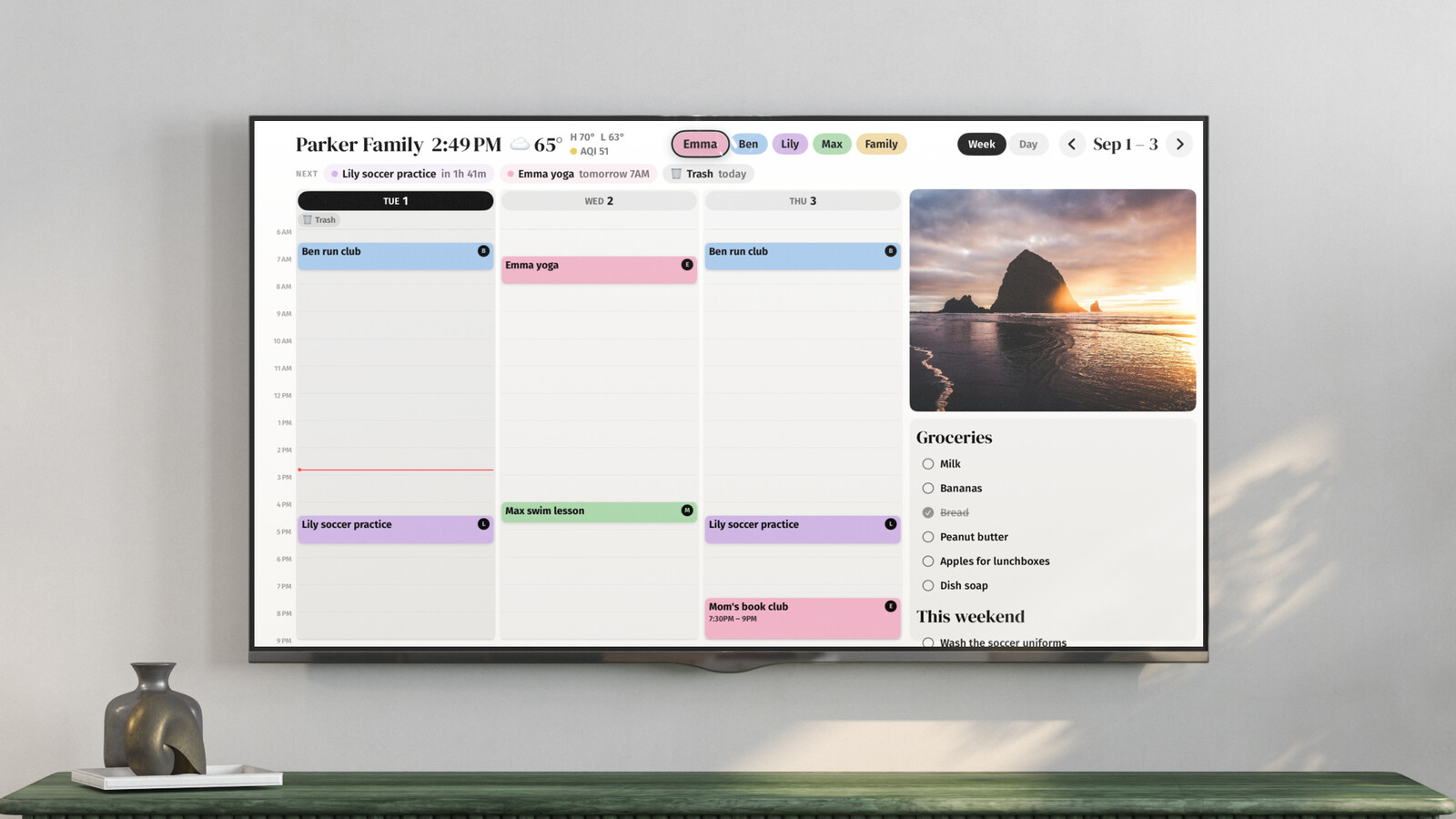
The limits: a TV isn't a touchscreen, so you add events on your phone, not on the board. Callie doesn't have chore charts or meal planning. And for now the Google TV app is in a Google Play test that anyone can join.
Special cases
- Two homes. Co-parents have different needs, and sometimes a court order. See a shared calendar for co-parents.
- You want photos on the same screen. Several displays double as photo frames, some only with a subscription. See digital photo frames with a calendar.
- Mixed iPhone and Android. Google Calendar, or combine both into one view.
What it costs over three years
| Option | Three years |
|---|---|
| Google, Apple, or Outlook calendar | $0 |
| Cozi Gold | $117 |
| DAKboard Essential, on a screen you own | $180 |
| Echo Show 15 | $349.99 |
| Skylight Calendar 2 (15") with Plus | $536.99 |
| Skylight Calendar Max (27") with Plus | $806.99 |
| Hearth Display, membership prepaid | $906.36 |
| Callie, on screens you own | $0 for now, then $90 |
Hardware prices are list prices; Hearth and Skylight both run sales. The pattern worth noticing: every product on the wall-display list is a screen showing a color-coded week. If a screen already hangs where your family gathers, the cheapest wall calendar is software.
Questions people ask
What's the best free family calendar app?
Google Calendar with a family group, if your household mixes iPhone and Android. Apple's Family Sharing calendar if everyone's on iPhone. Both are free with no ads.
Is there a family calendar app that works on iPhone and Android?
Google Calendar, TimeTree, Cozi, and FamilyWall all have apps for both. Apple Calendar is the one that doesn't.
Do I need a Skylight to have a calendar on the wall?
No. A Skylight is a screen with a calendar app built in. If you already have a TV, tablet, or spare monitor where the family gathers, an app on it does the same job. See Skylight alternatives.
Can I show our family calendar on the TV?
Yes, in several ways, from screen mirroring to a dedicated app. How to put your family calendar on your TV compares them.


